How to Create a Video Course
1. To create a video course, navigate to Video Courses on your Instructor Dashboard and click on Create New.
2. Planning Your Course
The foremost step in online learning is accommodating your knowledge and presentation skills in the best manner possible.
-
The delivery of your course is completely subjective. We recommend a thorough prep on the flow of the video course before recording the same.
-
The course content must be designed in a way that it takes into account the learners' foundational level knowledge.
3. Start by adding the following:
A. If you choose to offer a free course, select Pricing as Free.
NOTE: ALL YOUTUBE COURSES MUST BE OFFERED AS FREE.
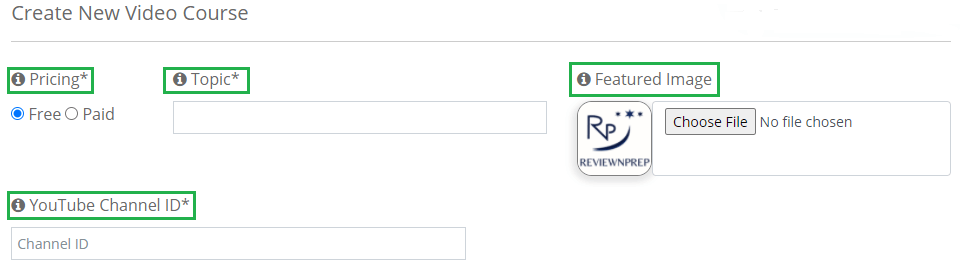
(a) Topic [Name that will appear when the course is searched]
(b) Featured Image [It should describe the course accurately with a size under 500 KB]
(c) YouTube Channel ID [Valid Channel ID] See details here.
B. If you choose to offer a paid course, select Pricing as Paid.
Image unavailable
This screenshot (de669cbe-2f2d-11ed-a061-3a787cc0d110) was lost when Flowlu's CDN was decommissioned. Replace with a fresh screenshot.
(a) Topic [Name that will appear when the course is searched]
(b) Featured Image [It should describe the course accurately with a size under 500 KB]
(c) Certification Authority [Pick one from the drop-down menu/ Add on your own]
(d) Certification Name [Pick one from the drop-down menu/ Add on your own]
(e) Short Description [Maximum 160 words]
(f) Selling Price ($) [Set your own selling price (Our recommendation: minimum $9.99 for a practice exam)]
(g) Platform Availability [Choose from App/ Web/ Both]
(h) Search Keywords [Multiple keywords can be added separated by commas]
(i) Course Type [Select the appropriate category from the drop-down]
4. Structuring Your Course
This is where you optimally organize the course content. In order to set your course apart, strategize your course in a way that the learners can utilize it to the best of their capabilities.
(a) Course Description [Detailed version of the course]
(b) Level [Choose from Beginner/ Intermediate/ Expert/ All Levels]
(c) Learning Objective [Certification details offered by the Certification Authority]
(d) Welcome Email to Student [It is sent to the buyer upon purchasing your course]
5. Take your time to fill in all the details. Once done, click on Create Course.

6. You have successfully created a course.
